Built for the bookends of the pursuit decision

Seven capabilities. One outcome at a time.

BidWERX is the intelligence layer between you and the next award. Score the opportunity before you commit, structure the requirements while you work, and grade the draft before you submit — so every decision in your pursuit is informed before it gets expensive. No proposal generation. No generic AI output. Built for how federal evaluators actually score.

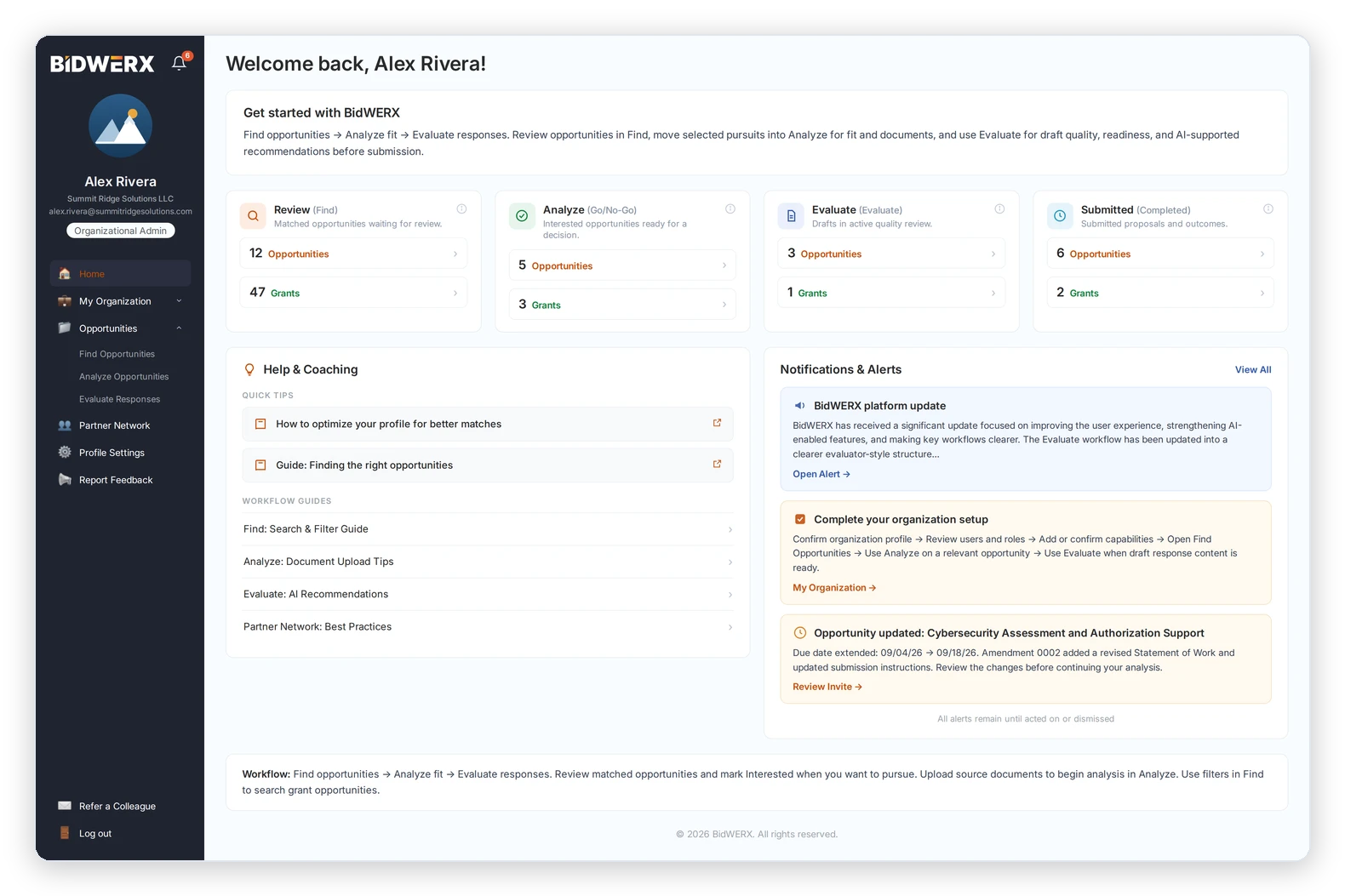
BidWERX home dashboard showing opportunity review, go/no-go analysis, response evaluation, submitted opportunities, coaching resources, notifications, and organization navigation.
how the pieces fit

Find it. Work it. Win it.

Seven capabilities, mapped to the three moves that decide a federal pursuit. Find It / Work It / Win It maps to the product workflow — Find, Analyze, Evaluate.

Find it — find

Surface the opportunities worth your time.

FitScore · Grants.gov Filtering · Partner Network
Work it — analyze

Decide whether to pursue — before the pursuit gets expensive.

FitScore · Grants.gov Filtering · Partner Network
Win it — Evaluate

Submit the strongest possible response.

Response Evaluation · User-Defined Rubrics
Find it

Surface the opportunities worth your time.

fitscore

Know whether you're competitive before you write a word.

Most BD time is spent on opportunities the team was never positioned to win.

FitScore is profile-based. Set up your organization profile once — organizational capabilities, certifications, socio-economic status, NAICS codes, and PSC codes. BidWERX then scores each live SAM.gov opportunity against that profile, auto-identifying the capabilities each solicitation calls for and matching them against what you bring. In seconds, you see whether the opportunity was designed for an organization like yours — and exactly which gaps stand between you and a competitive bid.

Every SAM.gov opportunity scored against your profile in seconds
Automatic capability matching from the solicitation text
Profile-based — set it up once, and it applies everywhere
Prioritization support against your fit — never a win-probability prediction
Available on Individual, Team Starter, and all Org plans. Not available on Contributor. SAM.gov opportunities only — Grants.gov uses the separate filtering workflow below. The SAM.gov feed is updated automatically each day.
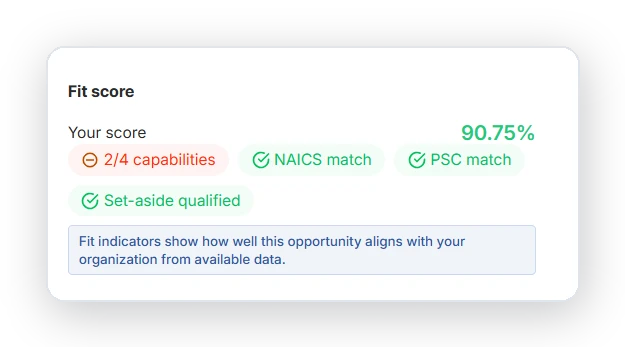
BidWERX Fit Score panel showing a 90.75% opportunity fit, with matches for NAICS, PSC, and set-aside eligibility, and 2 of 4 capabilities matched.
Grants.gov Filtering

Federal grant opportunities filtered down to the ones you can actually win.

Grants.gov lists hundreds of active solicitations at any moment — and most of them are irrelevant to any given organization.

Build a search profile from keywords and field values — agency, program type, eligibility criteria, funding range, and organizational focus — and BidWERX filters the daily Grants.gov feed down to a relevant set your team can actually evaluate. Instead of sorting listings by hand, your development staff sees only the opportunities that fit what your organization does. Paired with SAM.gov and FitScore, it makes BidWERX one of the few platforms built for organizations pursuing federal contracts and federal grants under a single subscription.

Keyword-and-field search profile tuned to your eligibility and focus
The Grants.gov feed is updated automatically each day
Covers both sides of the house — SAM.gov contracts and Grants.gov grants
Available on Individual, Team Starter, and all Org plans. Not available on Contributor. FitScore does not apply to Grants.gov opportunities — Grants.gov uses the keyword-and-field search profile described here.
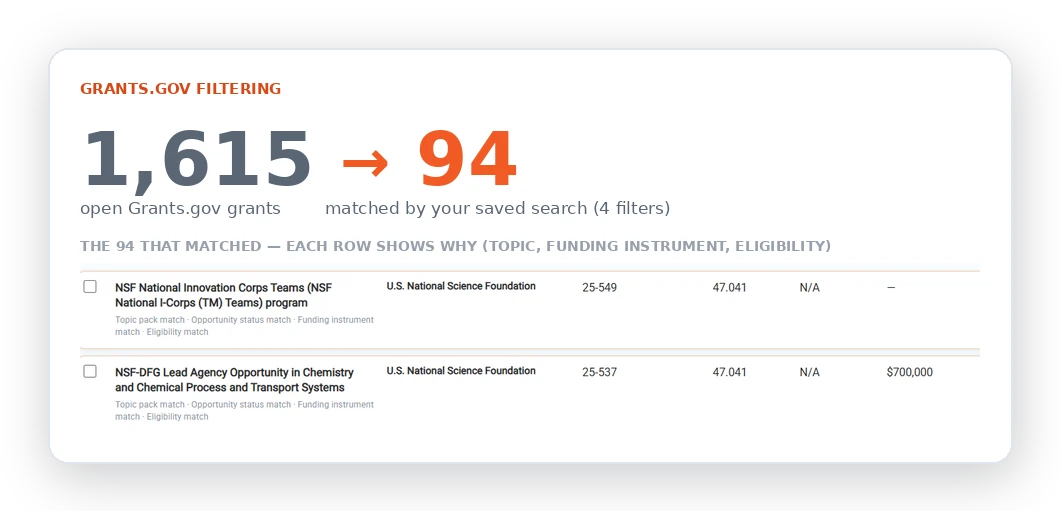
BidWERX Grants.gov filtering example showing 1,615 open grants narrowed to 94 matches using four saved-search filters, with matching reasons displayed for each grant.
Partner Network
Org starter and above

Build your teaming ecosystem. Widen the pool of opportunities you can win.

Some opportunities need capabilities you don't have — and some of your best pursuits are ones you'd never chase alone, but could win as a team.

Add the partners you already team with to your Partner Network, and BidWERX matches their capabilities against live opportunities right alongside your own profile. Opportunities you'd screen out solo — because you don't hold every required capability — surface as pursuits you could win together, expanding your pipeline instead of shrinking it. It works the other direction on any single opportunity, too: where the solicitation calls for a capability no one on your team has, BidWERX flags the gap and surfaces Partner Network members who fill it — a targeted match on the pursuit in front of you, not a directory to scroll. And when other organizations pursue opportunities you'd fit, your profile can surface you as a potential teaming partner. BidWERX handles the discovery and matching. The teaming relationship happens between you and the partner, outside the platform.

Add your teaming ecosystem — BidWERX matches your partners to opportunities and widens your pursuit pool
Automatic gap matching at the opportunity level
Passive discovery — on by default, switchable off, no unsolicited inbox noise
One-step email invitation to partners, whether or not they're already on BidWERX
Org Starter and above. Not available on Contributor, Individual, or Team Starter. Partner Network is discovery and matching only; BidWERX does not manage teaming agreements or facilitate joint proposal work.

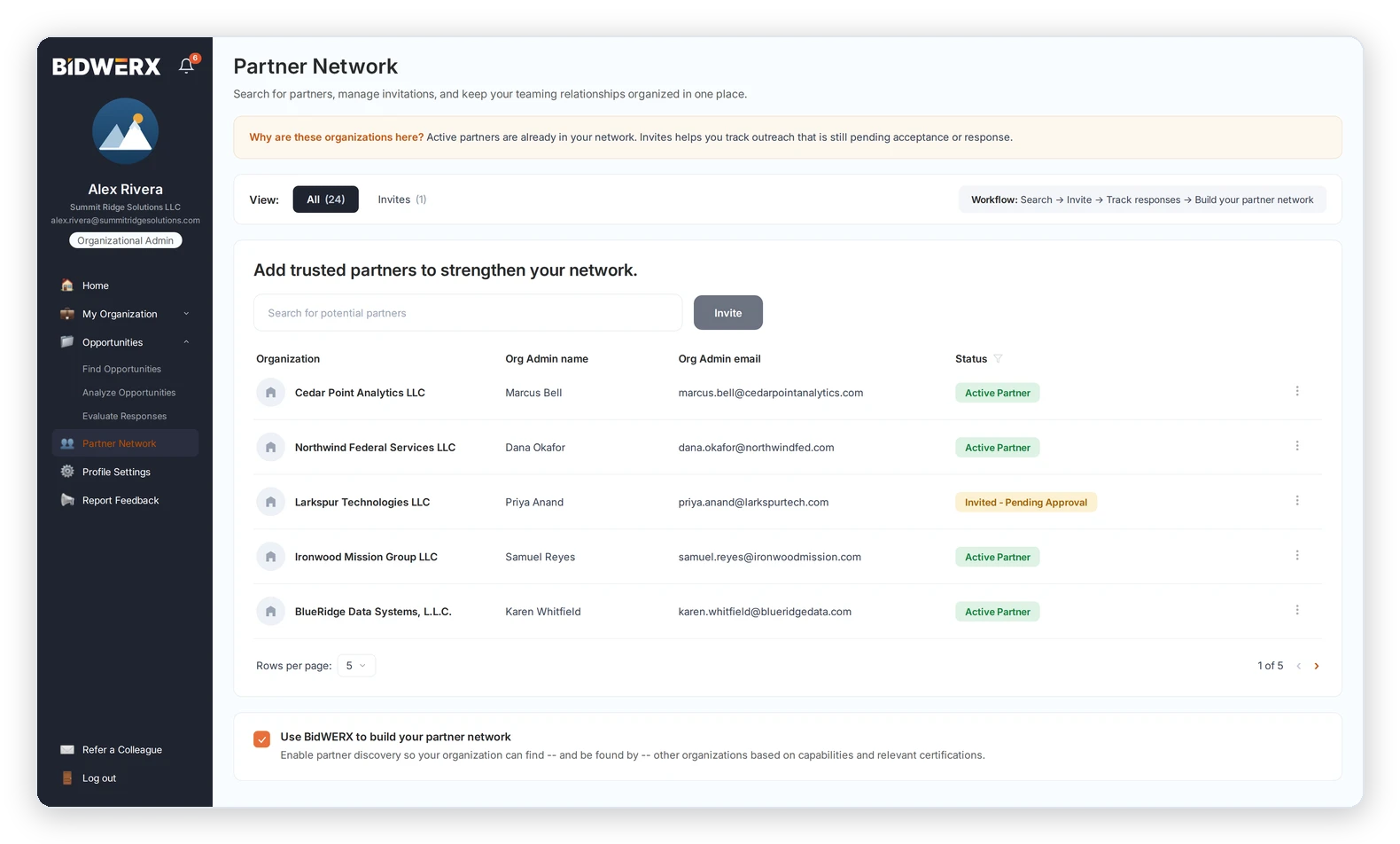
BidWERX Partner Network screen showing organizations, administrator names and emails, partnership status, search and invite tools, and controls for managing teaming relationships.
work it

Decide whether to pursue — before it gets expensive.

Analyze

Read a 60-page solicitation in the time it used to take to find the good parts.

The first hour of every solicitation read is spent hunting for what actually matters. You don't have that hour to spare.

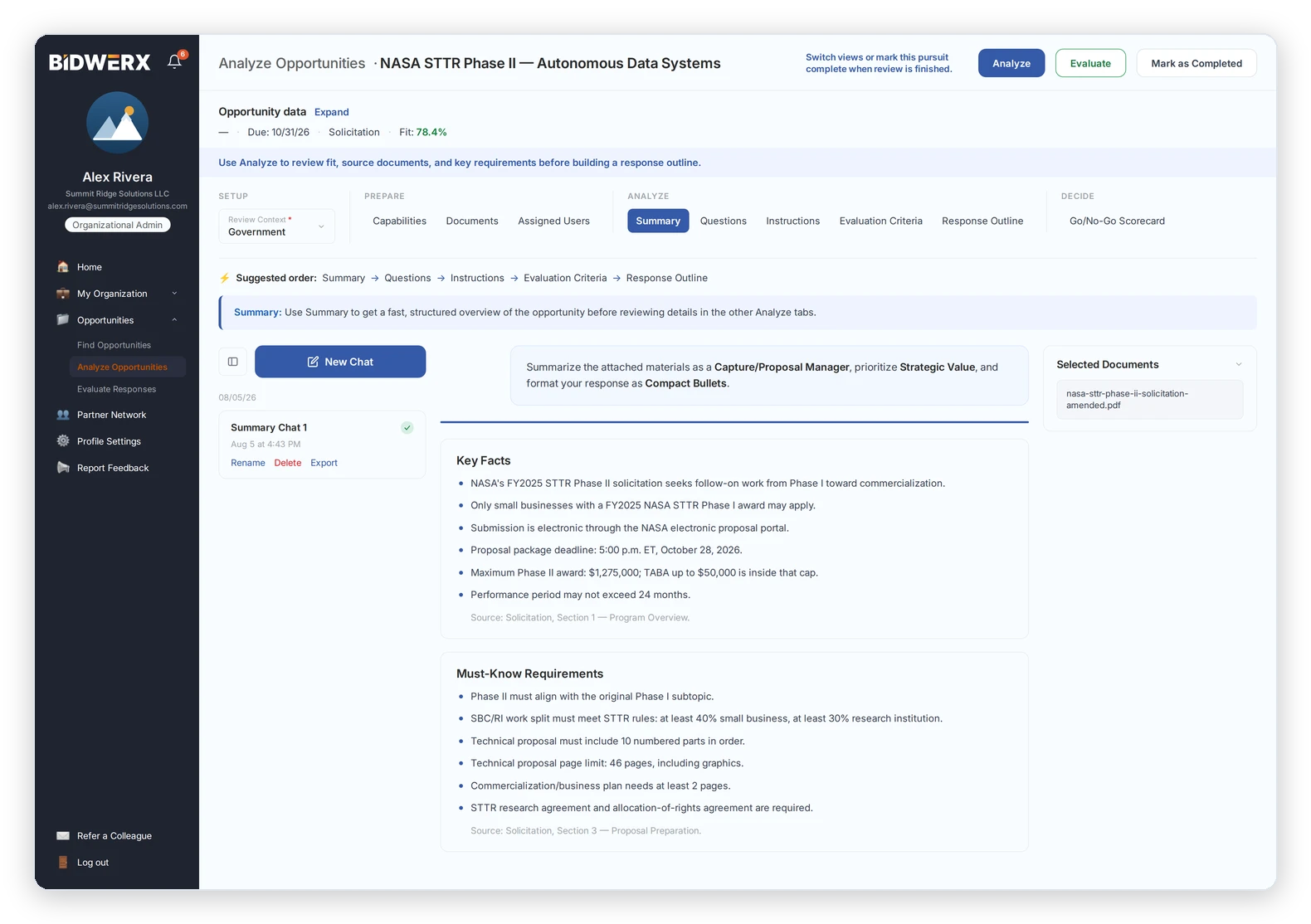
Analyze turns a dense solicitation into a focused decision through five structured tabs — plus the Go/No-Go Scorecard as the culminating step. Use it pre-Go on as many opportunities as you want: Analyze does not count against your active-pursuit allowance, so you can triage freely before committing to anything.

Summary — a plain-language digest of what the opportunity requires and who it's for
Questions — the unresolved eligibility and requirement ambiguities to clear before you invest
Instructions — page limits, formats, mandatory sections, and due dates that get bids disqualified when missed
Evaluation Criteria — what reviewers will score and how they'll weight it, pulled from the solicitation
Response Outline — a structure mapped to those criteria (a framework, not a written draft)
Go/No-Go Scorecard — a defensible pursuit recommendation (Team Starter and above)
All five Analyze tabs are available on every plan. Manual opportunity entry is available on every plan; the automatic daily SAM.gov and Grants.gov feed is included on Individual and above (Contributor uses manual entry only). Go/No-Go Scorecard: Team Starter and above.
BidWERX Analyze Opportunities screen showing an AI-generated summary of a NASA STTR Phase II solicitation, including key facts, must-know requirements, and selected source documents.
Go / no-go scorecard
Team starter and above

Bring more than instinct to the most expensive decision in the pursuit.

The wrong Go costs you $20,000 to $50,000 in staff time. The wrong No-Go costs you a contract you were positioned to win.

The Go/No-Go Scorecard draws on everything you've worked through in Analyze — the summary, the instructions, the open questions, and the evaluation criteria — and returns a structured pursuit recommendation you can defend to the person who signs off. It's most effective as the culminating step, after you've examined fit, requirements, and how the opportunity would be scored. You make the call. BidWERX makes sure the call is grounded in more than a gut feeling and a compelling title.

Synthesizes the Analyze tabs into one structured, defensible recommendation
A paper trail for every pursuit decision — not a gut call you can't explain later
Live and available on Team Starter, Org Starter, Org Growth, and Enterprise
Team Starter and above. Not available on Individual or Contributor as a paid feature — but every trial user gets full Go/No-Go Scorecard access for the length of the 14-day free trial, regardless of plan. SAM.gov opportunities only.
BidWERX Go/No-Go Scorecard showing an opportunity score of 84.4 with a recommended and final Go decision, along with kill criteria and weighted pursuit ratings.
win it

Submit the strongest possible response.

Response evaluation

Catch the gap that costs you the award — before you submit.

Most proposal teams find out where their response fell short in the reviewer's scoring sheet — weeks after the award, when nothing can be changed.

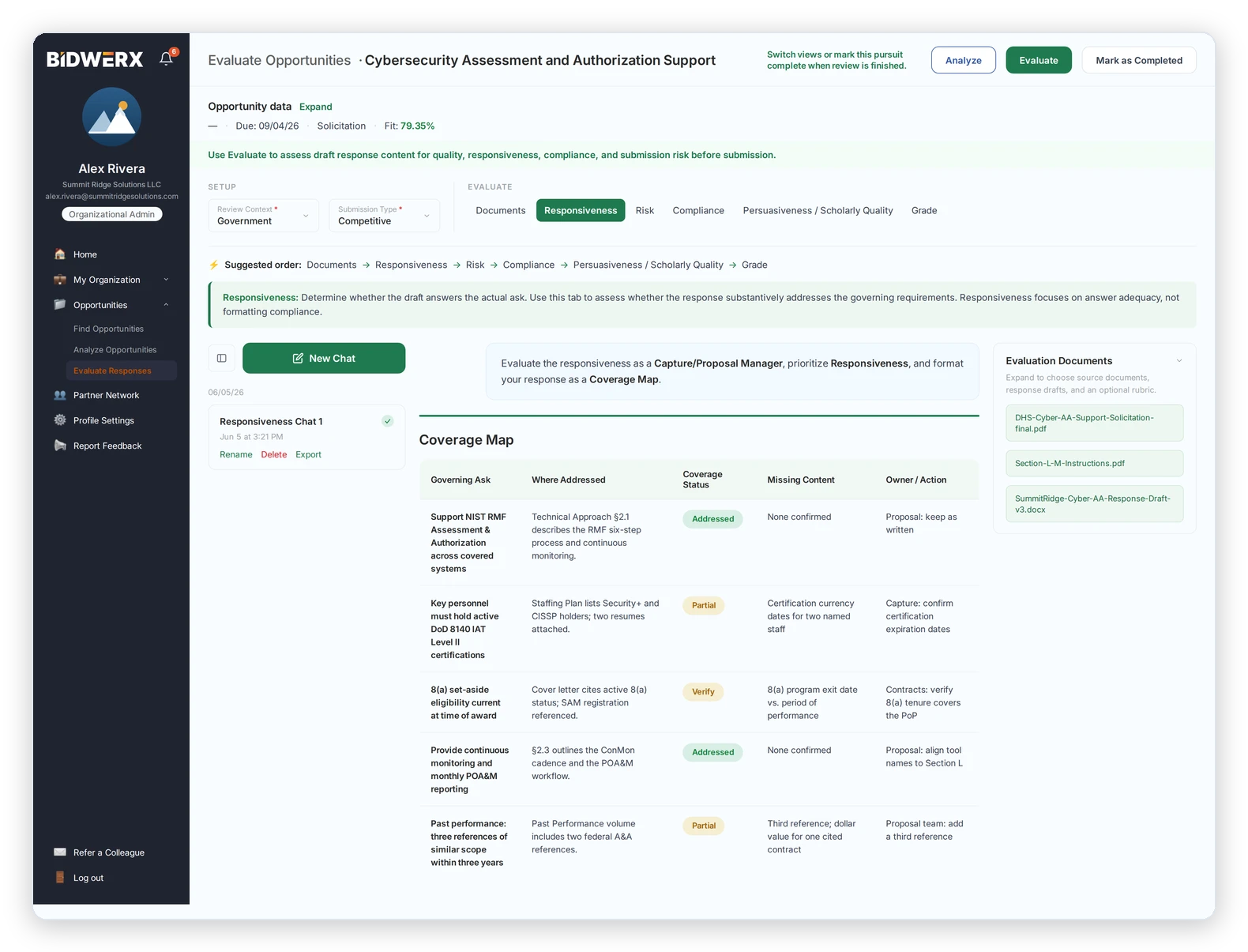
Submit your written response — a technical approach section, a capability narrative, a full draft — and BidWERX evaluates it against the specific evaluation criteria in the solicitation you provide. It reads the draft the way an evaluator would, across four dimensions, and shows you exactly where the response is strong, where it's thin, and where it invites a down-score — while there's still time to fix it. This isn't a grammar check or a writing assistant. It's a structured read on whether your response answers what the evaluator is actually scoring.

Responsiveness — does the draft answer what the solicitation asks
Compliance — does it meet the instructions, format, and mandatory sections
Persuasiveness — does it make the case an evaluator can score in your favor
Risk — where reviewers are most likely to take points off
An overall Grade reflecting how well the draft is positioned against the solicitation's evaluation basis — not a prediction of the agency's award decision
Available on every plan, including Contributor at $30/mo. The primary criteria always come from your source document. GovCon Evaluation Mode layers in built-in rubrics reflecting the evaluation criteria for major federal grant and contract programs. Upload your source document and your draft directly — no daily feed required.
BidWERX Evaluate Responses screen showing a responsiveness coverage map that identifies solicitation requirements, where each is addressed, coverage status, missing content, and recommended actions.
User-defined Rubrics
Org starter and above

Build the rubric once. Evaluate everything against it.

Your best reviewer knows exactly what to look for. The day they leave, that knowledge walks out with them.

BidWERX's built-in frameworks cover federal solicitation criteria. User-Defined Rubrics lets you encode the criteria specific to your organization — the evaluation criteria from a funding opportunity announcement or BAA, prior reviewer comments, or your own internal quality bar — into a rubric that applies to every future draft. Systematize what your most experienced reviewers know, and apply it consistently across submissions and team members. It extends Response Evaluation with a standard that's uniquely yours.

Build from any source — the evaluation criteria for major federal grant and contract programs, reviewer comments, or internal standards
Apply the same rubric consistently across drafts, submissions, and people
Persists in your account — institutional knowledge stops depending on who's in the room
Org Starter and above. Not available on Contributor, Individual, or Team Starter.
straight about the boundaries

What BidWERX doesn't do — on purpose.

Knowing what a tool won't do is how you trust what it will. BidWERX is a proposal intelligence layer, not an all-in-one platform. Here's where the line sits:
It doesn't write your proposal. No generated proposals, sections, or outlines. BidWERX evaluates and structures; the writing and the judgment stay yours.
It doesn't track pre-solicitation work. The workflow starts when an opportunity posts to SAM.gov or Grants.gov — not at the rumor or forecast stage.
It doesn't replace your CRM or capture pipeline. BidWERX is standalone; it doesn't integrate with capture, CRM, or pipeline tools.
Teaming is early-stage. Partner Network handles discovery and matching. It's a useful edge, not the reason to buy.
The profile stays canonical. Your organization profile holds capabilities, certifications, socio-economic status, NAICS codes, and PSC codes — and nothing you'd have to invent.

See what BidWERX finds on a real opportunity.

The best way to understand BidWERX is to run it on a solicitation you're actually weighing. Put your first opportunity through FitScore and your first draft through Response Evaluation before the trial week is out. 14 days free. No credit card.

Start Free Trial — No Credit Card
Ready to stop chasing bids you won't win?
Start 14-Day Free Trial — No Credit Card